
You can extend Cognidox search capabilities by using search operators.
Watch the video
Check out the short video, then read the summary below.
Search Operator Help
You can access the search operator help as follows:
- Click in the Cognidox search bar and choose Search Helper.
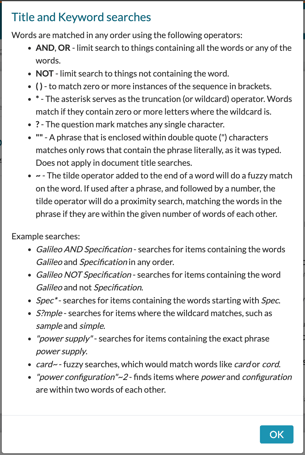
- View the information, then click OK to dismiss the window.
Performing a Search using Search Operators
-
Click on the Search Menu.
-
Enter a keyword or phrase that includes one or more search operators (e.g., “Spec*” searches for all items containing words starting with Spec).
-
View results containing the search term in document titles or part numbers.
See below for details on specific search operators.
Title and Keyword searches
Words are matched in any order using the following operators:
- AND, OR - limit search to things containing all the words or any of the words.
- NOT - limit search to things not containing the word.
- ( ) - to match zero or more instances of the sequence in brackets.
- * - The asterisk serves as the truncation (or wildcard) operator. Words match if they contain zero or more letters where the wildcard is.
- ? - The question mark matches any single character.
- "" - A phrase that is enclosed within double quote (") characters matches only rows that contain the phrase literally, as it was typed. Does not apply in document title searches.
- ~ - The tilde operator added to the end of a word will do a fuzzy match on the word. If used after a phrase, and followed by a number, the tilde operator will do a proximity search, matching the words in the phrase if they are within the given number of words of each other.
Example searches:
- Galileo AND Specification - searches for items containing the words Galileo and Specification in any order.
- Galileo NOT Specification - searches for items containing the word Galileo and not Specification.
- Spec* - searches for items containing the words starting with Spec.
- S?mple - searches for items where the wildcard matches, such as sample and simple.
- "power supply" - searches for items containing the exact phrase power supply.
- card~ - fuzzy searches, which would match words like card or cord.
- "power configuration"~2 - finds items where power and configuration are within two words of each other.
Useful online help topics
What next?