
🎬 Watch the video
📝 Overview
The Cognidox LMS includes powerful reporting tools to help you track:
-
Who has completed which training
-
Who is overdue or awaiting assessment
-
Skill achievement across your organisation
Reports are available in the Training Reports portlet and in the Learning Management System Reports section.
📊 Types of reports
Some of the most useful reports include:
| Report type | Purpose |
|---|---|
| User-to-Training Requirement Matrix | See training status for users against all assigned requirements |
| User-to-Skill Matrix | Monitor progress against defined skill levels |
| Training Overdue or Incomplete | Highlight users who are behind or haven't started |
| Manager Review Required | Flag assessments that failed multiple attempts and need review |
You can filter most reports by:
-
User group
-
Individual user
-
Specific training requirement
-
Skill
🛠 How to access LMS reports
Note: What you see in the Training Reports portlet depends on your LMS roles or which training requirements you have reporting rights to.
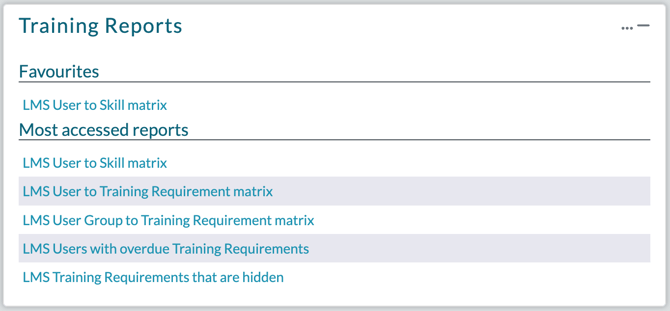
From the Training Reports portlet:
-
Quick access to the reports you use most often
-
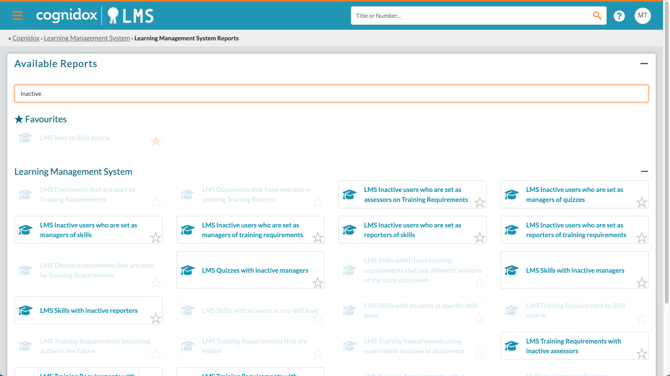
Click More (⋯) → Learning Management System Reports for the full list of reports;
-
Start typing in the Filter field to narrow down the list
- Click the star icon to add a report to your Favourites list
-
From the My Training portlet:
- Click More (⋯) → Learning Management System → Reports for the full list of reports
Or, from the main menu:
- Choose Manage Cognidox → Reporting tab → Cognidox Reports and type LMS into the filter field at the top
📥 Exporting data
Many LMS reports can be downloaded as Excel files for:
-
Archiving
-
Internal auditing
-
External compliance reporting
Just click the Export button in the report interface.
You can also click the down arrow on the Export button which provides the following drop-down options:
- Copy: copy report data to the clipboard
- CSV: download report data as a CSV file.
📈 Example use cases
-
A team leader checks which trainees still need to complete their onboarding
-
An H&S officer runs a report to ensure annual Fire Safety training is up to date
-
A compliance manager exports a list of expired certificates for audit prep
-
A training coordinator views skill coverage across departments
🧠 Tips for better reporting
-
Use user groups strategically to make reporting more meaningful
-
Encourage managers to review the Skill Matrix monthly
✅ What happens next?
-
Continue tracking training and skill progress over time
-
Use reports to support reminders, follow-ups, and compliance actions
-
Combine reporting with Skills and Objectives for long-term planning