🎬 Watch the video
📝 Overview
In the Cognidox LMS, a Skill is a way to group multiple training requirements into a structured framework of objectives, aligned to increasing levels of user competency.
Each Skill comprises up to five skill levels (e.g. Aware, Competent, Advanced), with one or more training requirements mapped to each level. These are known as the Skill’s objectives.
You can use Skills to represent areas like Product Knowledge, Cybersecurity Awareness, or ISO Compliance, and track how users are progressing through the required training.
Each Skill can:
-
Group training into logical categories or domains
-
Map training requirements to specific competency levels
-
Provide reporting on user readiness and skill achievement
-
Be managed by named users or groups with appropriate LMS permissions
🎯 Why use Skills?
Skills allow you to:
-
Track progress toward broader competencies
-
Report on training status
-
Identify gaps in learning across departments or roles
-
Organize training in a meaningful, layered way
🛠 Creating a Skill
To create a new skill:
-
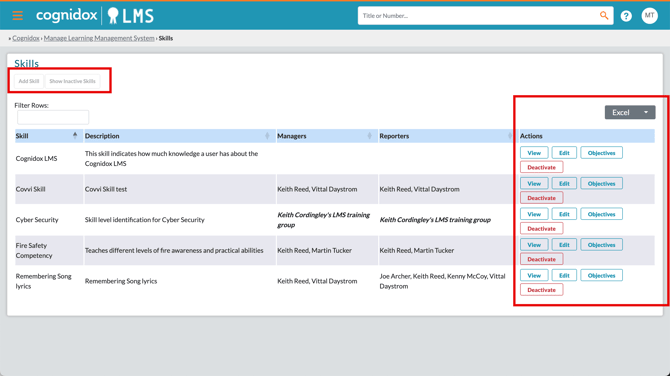
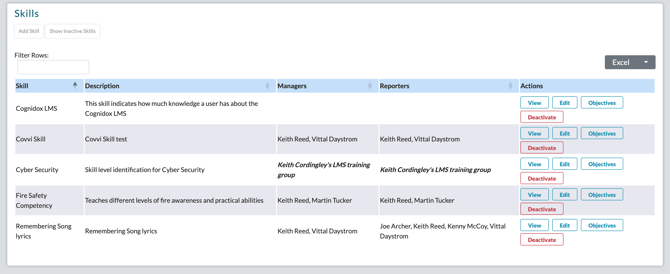
Go to Manage the Learning Management System > Skills
-
Click Add Skill
-
Fill in the following:
-
Skill Name (e.g. Cybersecurity Awareness)
-
Skill Description (e.g. describe what the skill brings to your organisation, and to whom it is relevant)
-
Active – Enable this to make the skill visible in the LMS GUI
-
-
Assign:
-
Skill Managers – Can edit and manage the skill
-
Skill Reporters – Can view skill-related reports
-
-
Click Save Skill
You’ve now created the framework. Next, add training objectives to define what each level of the skill means.
🧩 Mapping Objectives to Skill Levels
Each Skill can contain up to five levels, representing increasing proficiency:
| Level | Label |
|---|---|
| 1 | Aware |
| 2 | Competent |
| 3 | Advanced |
| 4 | Trainer |
| 5 | Train the Trainer |
✏️ How to assign training requirements to skill levels
-
Go to Manage the Learning Management System > Skills
-
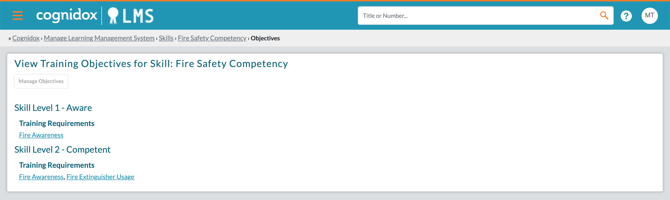
Find your skill and click View
-
Go to the Objectives tab, then click Manage Objectives
-
For each skill level:
-
Click Set Training Requirements to assign one or more existing training requirements
-
Remove any that are no longer needed
-
Optionally add a comment (e.g. describing the goal for that level)
-
-
Click Save Objectives
🔄 Example: Building a Multi-Level Skill
Let’s say you create a Skill called Fire Safety Competency. You can define objectives for each level by assigning one or more training requirements per level:
| Skill Level | Assigned Training Requirements |
|---|---|
| Level 1: Aware | Fire Awareness |
| Level 2: Competent | Fire Awareness Fire Extinguisher Usage |
| Level 3: Advanced | Fire Awareness Fire Extinguisher Usage Competency tracking Fire Safety Risk Assessment |
| Level 4: Trainer | Fire Safety Procedures for Trainers, Training Delivery Skills |
| Level 5: Train the Trainer | Internal Trainer Accreditation |
📊 Reporting on Skill Progress
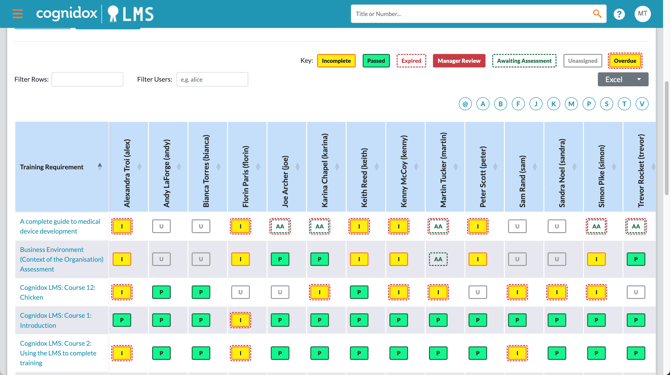
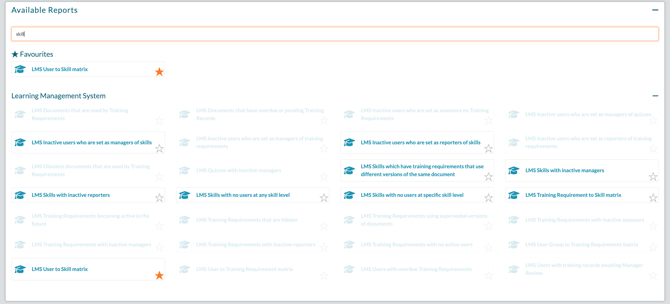
Trainees won’t see Skills in their day-to-day interface — but their skill achievements are fully tracked and appear in LMS reports, including:
-
User-to-Skill Matrix
-
Training Requirement to Skill matrix
These allow managers to monitor who has achieved which level of each skill, and who may need reminders or further support.
🔐 Access and Permissions
-
Skill Managers can add/edit skills and objectives
-
Skill Reporters can run reports on user progress
-
Skills are only visible to users with the appropriate LMS permissions (e.g. Act as LMS manager, View all LMS reports)
✅ What happens next?
Once your skill is defined and objectives mapped:
-
You can report on user progress toward each level
-
Managers can track readiness by domain or job function
-
You can refine or expand skill definitions as your training evolves
- You can manage skills and objectives from the Skills page, and deactivate skills that are no longer needed.